Most teams experimenting with coding agents eventually hit the same wall: agents do not have infinite context or memory to complete long-running tasks. Beads was built to address that across a single developer's workspace. Part of what I love about Steve Yegge's projects is they're a cross between unserious toys and prototypes of the future. Beads was enough of an example for me to build Warrant.
It keeps branch-level and task-level context so your agent stays on task and can keep working through long-running initiatives. Better yet, the LLM shares connected context with the people you're working with; not a private chat thread on one side and a separate issue tracker on the other. I'm aiming for the same territory as Jira and Linear, with agents and humans as first-class users.
Under the hood it's a work queue with shared context: organizations and projects, each with a
context pack (conventions, file hints, system prompt), and tickets that move through a graph.
Agents connect over MCP (for example from Cursor) or the REST API; people use the
web UI or the same API to create work, review outcomes, and resolve escalations. One server
serves the API, MCP at /mcp, and the SPA.
Below is how it looks from a user's perspective, and why the design is shaped that way.
What Warrant is
- Organizations and projects scope who owns what.
- Work streams group tickets toward an initiative like a feature, a migration, a research spike. Each work stream has a Markdown-based plan that carries the larger context for the work.
- A context pack per project tells agents how you want work done, not only the ticket text.
- Tickets have an objective; they sit in a queue, get claimed with a lease, move to in progress, then submitted for review (or escalated when the agent needs you).
- Humans approve, reject, or answer questions; agents claim, execute, log steps, and submit.
That is intentionally the same vocabulary for people and automation: one system of record instead of parallel trackers, with work streams carrying initiative-level context above individual tickets.
The agent experience
The primary place I want you using Warrant is in your IDE: you shape a plan, hang it on a work stream when the work spans multiple tickets, and drive execution from the same tools.
Agents use MCP tools to stay inside the loop you already use in the editor; list projects, load context, claim the next ticket, start work under a lease, log steps as they go, then submit or escalate. The full ticket payload (objective, context pack, dependency outputs, prior attempts, human answers) is the single bundle the agent uses to do the job.
Authentication is usually GitHub OAuth: Cursor can open a browser, complete sign-in, and keep using the token. Headless flows can use API keys where that fits.
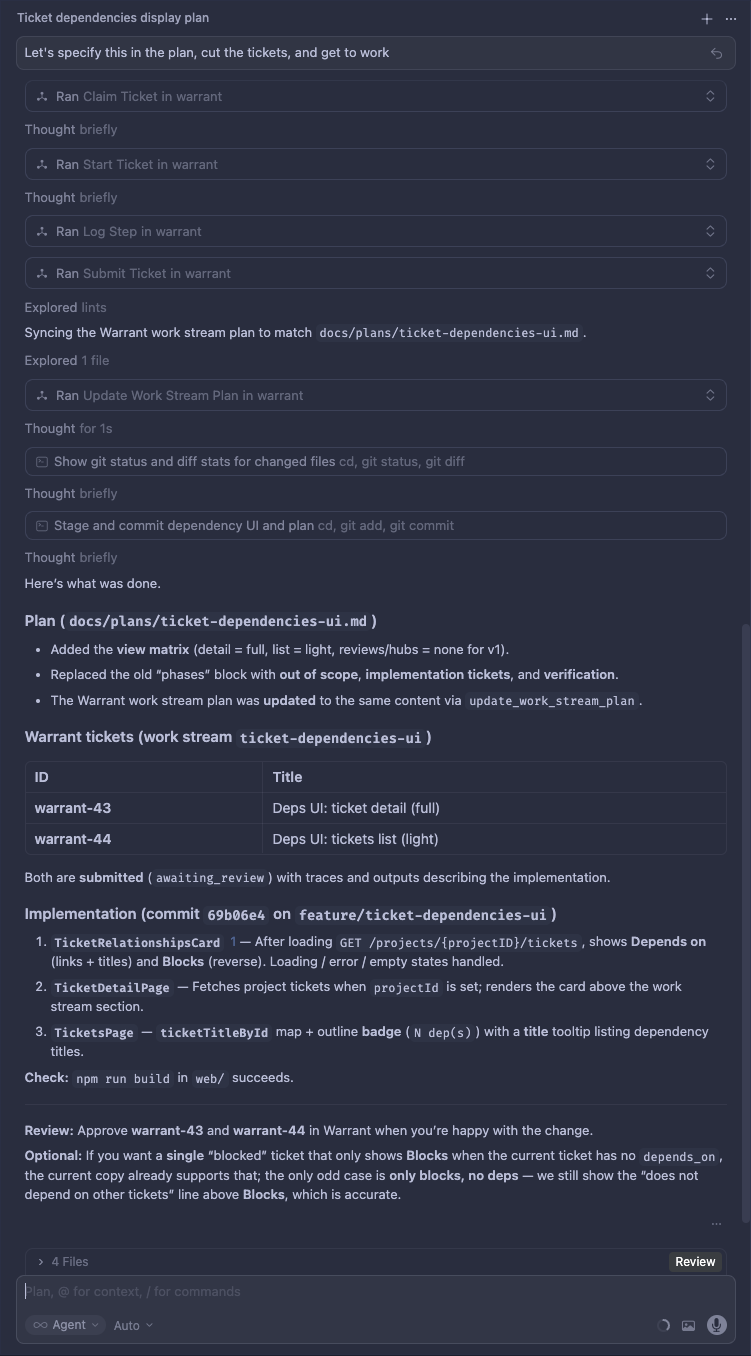
The agent runs the same lifecycle from the IDE
Why leases and steps
A lease is time-bounded. If it expires before you renew it or submit (because the IDE session ended, the process crashed, or you simply moved on) the ticket can return to the queue instead of staying "stuck" in someone's name forever. Steps form an execution trace: what the agent tried, saw, and decided, so review is grounded in behavior, not only a final diff.
I use structured errors to help the agent or client decide to renew, re-claim, or back off instead of opaque failures.
The human experience
The browser shows the same queue the agent works from in the IDE, tuned for triage and review. You set up orgs and projects, write context packs so “how we work here” is explicit, and tuck related tickets under work streams when an initiative spans more than one card. You add work, skim what’s open, and when something is ready you approve it or send it back. If the agent needs a judgment call only a person can make, it asks; you answer, and that answer stays on the ticket for the next pass.
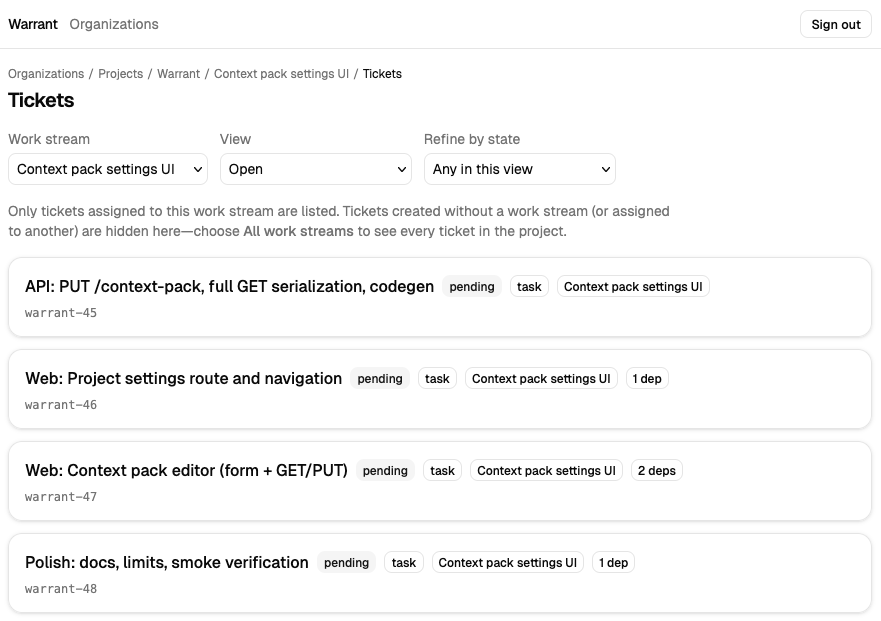
The stream dropdown narrows the list to one initiative, or you can open All work streams to see everything in the project. The little dependency counts say how many prerequisites are still in front of this ticket.
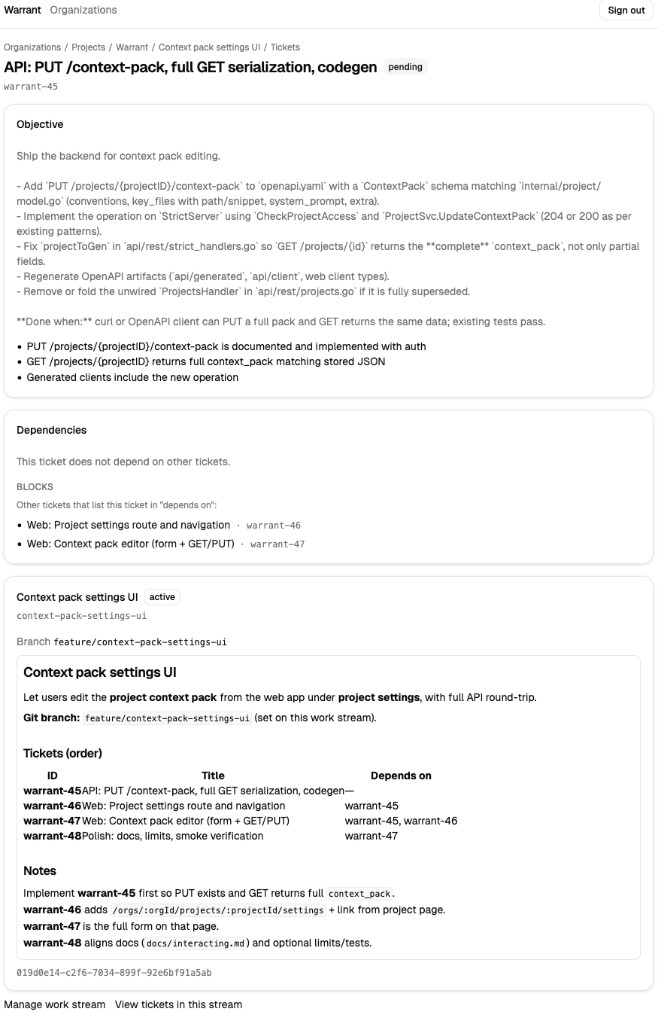
On a ticket page you get the written goal, what has to happen before and after this piece, and the work stream it belongs to (branch, notes, rough order), so the next person (or agent) does not have to rebuild the story from scratch.
How a ticket moves
At a high level:
- Claim picks prioritized work and issues a lease.
- Dependencies keep tickets blocked until upstream work is done; when unblocked, dependents see dependency outputs in their ticket payload.
- Submit hands off to a human for review; escalate pauses for an answer you provide.
That lifecycle is the same whether the “worker” is you, a CI agent, or Cursor; only the transport
(MCP vs browser vs curl) changes.
Why it works this way
One queue, two species of user. If agents only lived in chat history and humans only lived in GitHub issues, you would constantly reconcile two stories. Warrant makes the ticket the atom of work and the context pack the house style, so “do it like this repo” is not re-typed every session.
Review and escalation are first-class. Automation is cheap; wrong automation is expensive. Submitting for review and escalating for judgment keeps humans in the loop where judgment matters, without abandoning structured workflow.
Leases and traces are operational honesty. Long-running agent work fails in boring ways (timeouts, crashes, confused state). Leases bound damage; steps make "what happened?" answerable when something looks off.
MCP meets people where they already work. The IDE is the natural home for an agent; MCP tools map cleanly to claim → work → submit. The web UI is the natural home for triage, policy, and approval. Same backend, two surfaces.
Warrant is BSL-licensed with specifics for
production use; source and containers are on GitHub. The repo’s
one-line installer (curl the Docker setup script
into bash) creates a local .env, prompts for secrets when it can, and brings the stack up; you
need Docker with Compose v2, and a GitHub OAuth app if you want sign-in.